


Most artificial turf websites weren’t built for interpretation.
They were built to impress.
- Long product lists.
- Scrolling galleries.
- Every city added to the homepage.
That approach worked when search engines simply indexed pages.
AI systems don’t index.
They interpret.
Modern AI builds a structured map of your business:
- What you sell
- Where you operate
- Who you serve
- How everything connects
If those relationships are unclear, your visibility becomes inconsistent — even if your rankings look fine.
This isn’t about adding more content.
It’s about organizing what already exists.
In plain English: Your website is a warehouse. AI is the inventory scanner. If the aisles aren’t labeled, nothing gets counted correctly.
Structure is no longer optional.
It’s the layer that determines whether your business is validated — or overlooked.
Executive Summary
Artificial turf websites built like digital brochures struggle in AI-driven discovery.
AI systems evaluate structure, not just keywords.
To improve inclusion:
- Organize by clear hierarchies (Applications, Products, Locations)
- Dedicate pages to each physical location
- Simplify product catalogs
- Use structured data (schema markup)
- Maintain consistent internal linking
Structure determines interpretability.
Interpretability determines visibility.
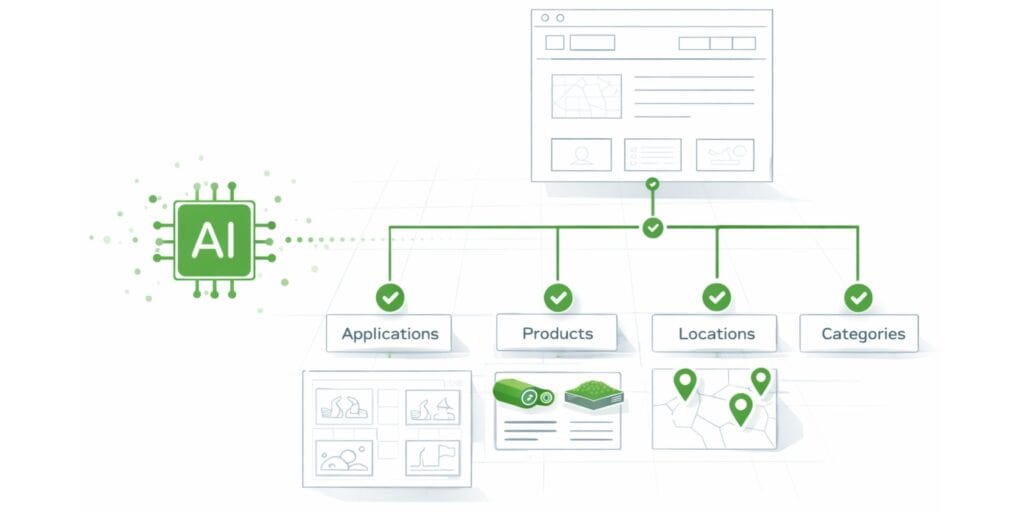
What AI Looks for in Website Structure
Search engines still index pages.
AI systems interpret structure.
That distinction matters.
AI assistants and AI Overviews evaluate how your content is organized, not just whether keywords appear.
Additional Resources:
- AI vs. SEO for Turf Companies: Why Structured Clarity Matters
- Local SEO for Turf Installers & Suppliers in the AI Era (Structure = Inclusion)
1. Semantic Hierarchy
AI prefers logical parent/child relationships:
- Home → Products → Product Detail
- Home → Applications → Pet Turf
- Home → Locations → Houston
If everything is linked randomly in the footer or mega-menu without hierarchy, AI struggles to interpret relationships.
Clear structure builds context.
2. Structured Data (Schema)
Structured data provides machine-readable signals.
Examples relevant to turf companies:
- LocalBusiness schema for each location
- Product schema for turf lines
- FAQ schema for buyer questions
Schema markup helps AI understand:
- What type of entity you are
- What products you sell
- Where you operate
It reduces guesswork.
3. Answer-Engine Optimization (AEO)
AI favors content that answers questions directly.
Instead of long keyword-stuffed paragraphs:
Use:
- Clear H2 and H3 headings
- Short summaries under each heading
- Direct answers in 2–3 sentences
- Bullet lists where appropriate
AI extracts structured blocks more easily than dense walls of text.
4. Technical Performance
AI systems consider:
- Page speed
- Mobile usability
- Crawlability
- Clean URLs
Large uncompressed images, bloated scripts, and disorganized navigation reduce structural clarity.
Fast, accessible sites are easier to parse.
5. Internal Linking Logic
Internal links define relationships.
For example:
- Pet turf page linking to relevant product
- Houston location linking to services offered
- Product pages linking to installation applications
When these connections are intentional, AI can map your ecosystem.
When they’re random, authority gets diluted.
6. Trust & Authority Signals
AI also looks for:
- Author credibility
- Citations to reputable sources
- Real project photos
- Consistent brand positioning
Structure alone isn’t enough.
Structured credibility matters.
The Core Shift
The goal is no longer: “Add more content.”
The goal is: “Organize existing content so it’s interpretable.”
Structure is information.
Volume without structure is noise.
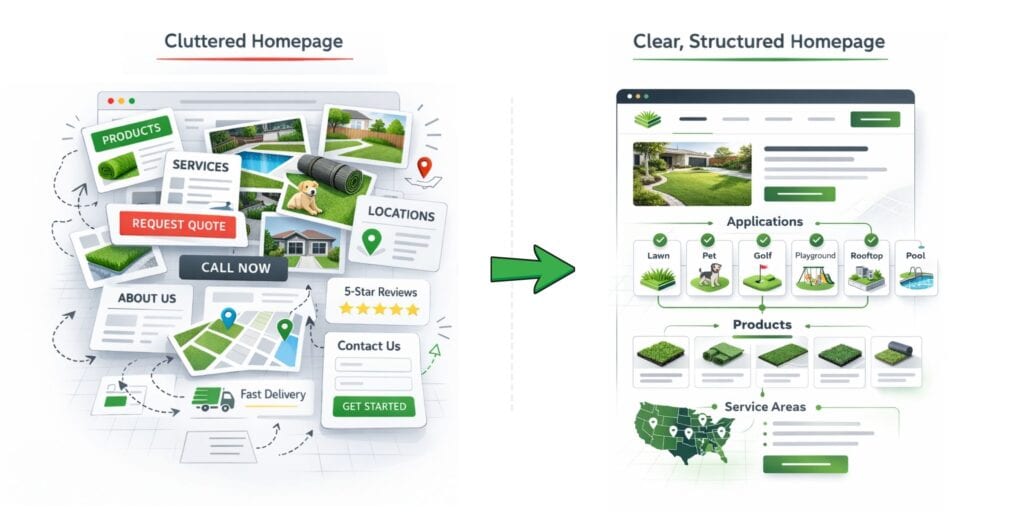
Common Homepage Mistakes: From Turf Vomit to Clarity
Many turf websites suffer from what we jokingly call “turf vomit” — a homepage overloaded with every product, service, city, promotion, badge, and testimonial all at once.
This isn’t just a design issue.
It’s a structural issue.
AI systems don’t just read your homepage.
They interpret it.
And when everything competes for attention, nothing becomes clear.
What AI (and Buyers) Expect from a Homepage
A homepage is not a storage unit.
It’s a navigation hub.
It should answer three questions immediately:
- What do you do?
- Where do you operate?
- What should I do next?
When those answers are buried under scrolling lists, stock photos, and competing calls-to-action, both users and AI struggle to understand your business model.
Signs of a Cluttered Homepage
- Long scrolling lists of every city, neighborhood, and county served
- Dozens of product thumbnails with no grouping
- Multiple CTAs (“Call Now,” “Get a Quote,” “Schedule,” “Learn More”) fighting for attention
- Dense paragraphs explaining who you are, what you do, and why you’re the best
- Slow loading speeds due to uncompressed images
- No clear, clickable phone number on mobile
- No obvious service area or geographic focus
From an AI perspective, this creates noise.
From a buyer’s perspective, it creates friction.
Why This Hurts AI Visibility
AI Overviews tend to reference companies that:
- Have clear calls-to-action
- Load quickly
- Present structured navigation
- Display trust signals (reviews, certifications, real project photos)
- Clearly define service areas
When your homepage looks like a pile of disconnected content, AI can’t easily determine:
- Your core services
- Your primary markets
- Your hierarchy of offerings
Structure becomes unclear and you get ignored in AI overviews.
Moving Toward a Navigation Hub
Think of your homepage as the lobby of your warehouse — not the warehouse floor.
Here’s a better structure:
1. Lead With Purpose
In one or two sentences:
- State what you do
- State who you serve
- State where you operate
Example: “Artificial turf installation for residential and commercial properties across Houston and DFW.”
2. Use One Primary CTA
Choose one dominant action:
- Get a Quote
- Schedule a Consultation
- Request A Callback
Make it visible above the fold.
3. Guide to Core Sections
Use clear buttons or blocks:
- Products
- Applications
- Locations
- About
- Contact
4. Link — Don’t List
Instead of listing every city:
- Link to a dedicated Locations page
Instead of showing every product:
- Link to a structured Product archive
A homepage that acts as a map is easier for users.
And easier for AI to interpret.
Clarity compounds.
In plain English: Cluttered homepages force both customers and AI to sort through everything. Most will give up.
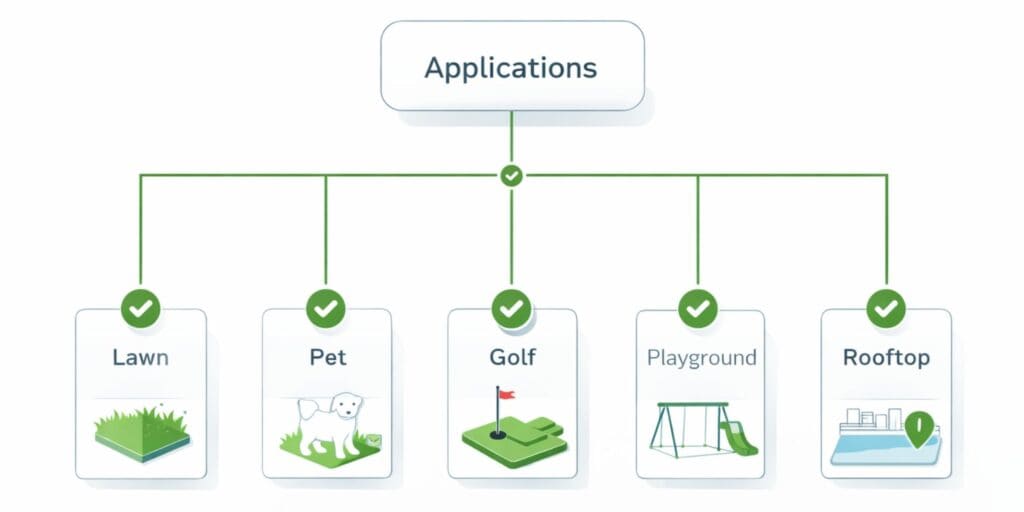
Segmenting by Application
Artificial turf is used in many contexts: athletic fields, backyards, pet runs, playgrounds, rooftops and more.
Grouping content by application helps both visitors and AI understand the breadth of your offerings without confusion.
Why Applications Matter
- Different Buyers Have Different Needs: A school athletic director cares about shock pads and field markings; a homeowner cares about drainage and feel.
- AI Categorizes By Use Case: When someone asks, “Which turf is best for pets?” AI looks for pages that explicitly address that application.
- Simplifies Navigation: Users can self‑select into their path, reducing bounce rates.
How to Segment Effectively
- Create Top‑Level Application Pages: For example: Sports, Residential, Pet & Play, Commercial Landscaping, Rooftops & Specialty.
- Describe Needs and Solutions: Use two or three paragraphs or bullet lists to explain challenges and how your products address them.
- Link to Relevant Products: Show only the turf products and accessories suitable for that application.
- Use Social Proof: Brief case studies or testimonials provide context without crowding the page.
This structure mimics a warehouse where each aisle is labelled by department.
Customers know whether they’re in the sports section or the pet section.
Workers (AI) can restock and count inventory accurately.
Applications are aisles in your digital warehouse.

Structuring Multi‑Location Pages
Suppliers and installers operating in multiple cities face a structural challenge.
AI doesn’t guess relationships between locations.
It reads how you define them.
The Core Principle: Hub-and-Spoke
AI favors a hub-and-spoke structure:
- A central /locations/ page
- Individual sub-pages for each physical location
- Clear internal linking between them
Example:
- /locations/
- /locations/texas/houston/
- /locations/texas/fort-worth/
- /locations/texas/dallas/
This hierarchy helps AI understand:
- These are separate physical entities
- They belong to one parent organization
- Each has defined attributes
Without this structure, everything blends together.
The Wrong Way
- One page listing every warehouse and service region
- Repeating the same content with minor city swaps
- Mixing shipping details, service areas, and physical addresses
- Creating city pages without an actual presence
This creates duplicate content and conflicting signals.
To AI, it looks like template expansion, not real location depth.
The Right Way
1. Dedicated Location Pages
Each physical warehouse or showroom should have its own page.
Include:
- Exact business name
- Full address
- Local phone number
- Operating hours
- Embedded Google Map
- Unique description of services available at that location
- Real local project examples
- Location-specific reviews
AI uses this information to validate that a location is real and distinct.
2. Clear Service Area Communication
If you serve surrounding cities from one warehouse:
Say so clearly.
Example: “Serving Northern Texas including Irving, Plano, and Arlington from our Dallas warehouse.”
Do not create thin city pages for areas without a physical footprint unless you clearly structure them as service areas.
3. Consistent Naming & NAP
Name, Address, Phone (NAP) must match your Google Business Profile.
Small inconsistencies reduce trust signals.
AI validation relies heavily on consistency.
4. Internal Linking
From your main Locations page:
- Link to each city page
- Link from each city page back to relevant product or service pages
This creates structural relationships AI can follow.
Clear multi-location structure tells AI:
“These are the physical places we operate; here is what each one does; here are the markets they cover.”
Without that clarity, inclusion becomes inconsistent.
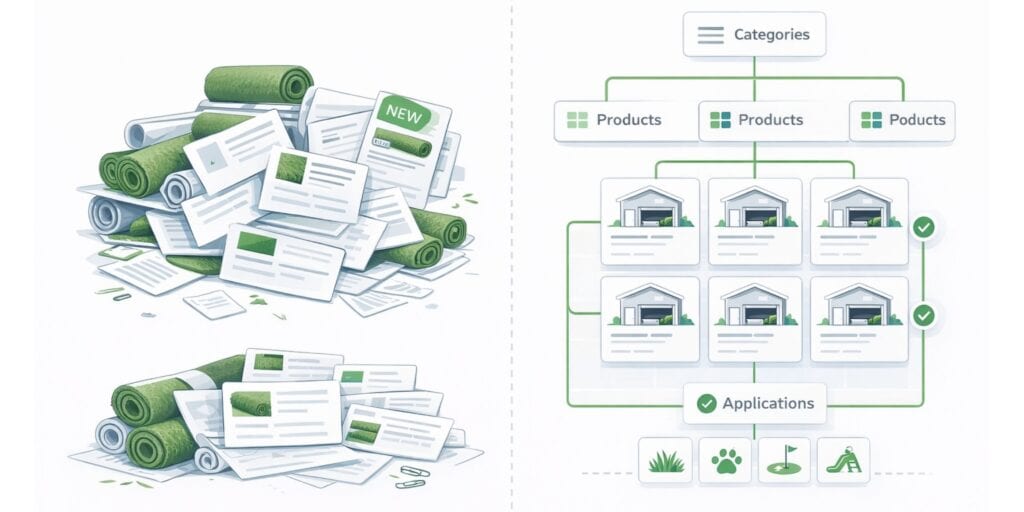
Simplifying Product Catalogs
Large turf companies often carry dozens of products: multiple turf fibers, infills, adhesives, shock pads and accessories.
Listing them haphazardly overwhelms visitors and confuses AI.
Organize Products Like Inventory
- Group by Category: Use high‑level categories such as Sports Turf, Residential Turf, Pet Turf, Infill & Accessories.
- Provide ComparisonTables: Instead of paragraphs, use tables that highlight differences in pile height, backing material and intended use.
- Avoid Duplicative Product Pages: Each product should have one canonical page with variations (colour, roll width) noted clearly.
Keep Descriptions Short
Write concise product descriptions that focus on:
- Key Features & Specs: e.g., UV resistance, drainage type, antimicrobial protection, pile height, etc.
- Ideal Applications: e.g., “Designed for high‑traffic sports fields” or “Designed for aggressive dog play”
Use bullet lists rather than dense paragraphs.
AI can parse lists more easily and map features to applications.
Cross‑Link Products intelligently
Link each product to relevant application pages and vice versa.
This builds a network of relationships that AI can follow.
Your site should link products to the pages where they’re most relevant.
How to Structure an AI-Friendly Artificial Turf Website
Restructuring a website for AI isn’t about adding more content.
It’s about clarifying relationships.
AI systems don’t “read” your site the way a person does.
They build a machine-readable representation of:
- Who you are
- Where you operate
- What you sell
- Who you serve
If those relationships are unclear, inclusion becomes unlikely.
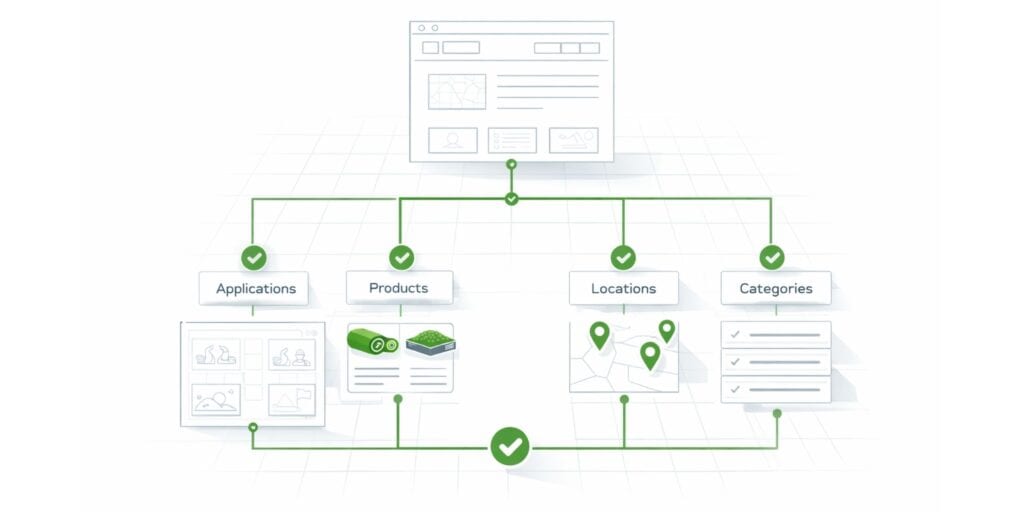
The most effective structure for turf companies, especially multi-location suppliers and installers is a hub-and-spoke model.
Think of your website like a distribution network.
The homepage is the warehouse.
Applications, products, and locations are the organized aisles.
AI is the inventory scanner.
If the aisles are labeled clearly, everything gets validated.
If they’re chaotic, the system hesitates.
Here’s how to structure it properly.
1. Establish a Clear Site Architecture (Hub-N-Spoke)
Your site should have a defined hierarchy, not a collection of loosely connected pages.
Central Hub
Your homepage should clearly link to core structural sections:
- Applications
- Products
- Locations
- About / Company
It should not try to rank for every city, product, and service variation at once.
Structured Subdirectories
Use clean subfolder structures:
- /applications/pet-turf
- /products/nylon-series
- /locations/texas/dallas
Avoid subdomains unless there’s a strong technical reason.
Subdirectories consolidate authority and clarify hierarchy.
Internal Linking Discipline
Each location page should:
- Link back to the main Locations hub
- Link to relevant Applications
- Reference applicable Products
Internal links create relationships between contextually relevant pages.
AI systems interpret hierarchy through structure, not just menus.
2. Build AI-Ready Location Pages
For multi-location operators, this is the most common failure point.
Each physical location should have its own dedicated page that includes:
Unique, Contextual Content
Avoid duplicating the same paragraph and swapping city names.
Include:
- Local market context
- Regional applications
- Nearby landmarks
- Location-specific testimonials
AI looks for differentiation to confirm legitimacy.
NAP Consistency
Your Name, Address, and Phone number must match:
- Google Business Profile (GBP)
- Directory listings
- Schema markup
Even small variations reduce confidence.
Clear Service Area Framing
If one warehouse serves multiple cities:
List those cities under a “Service Areas” section.
Do not structure them as separate physical locations.
3. Segment by Application, Not Just Keywords
Many turf sites structure around generic service pages.
Instead, create structured application hubs:
- Residential
- Lawn
- Pet
- Golf
- Play
- Pool
- Patio
- Sports
- Commercial
Each application page should:
- Define use case
- Link to relevant products
- Link to relevant locations
This allows AI to map:
Company → Application → Product → Location
That relationship chain matters.
4. Simplify Product Catalogs
Suppliers often overload product pages.
AI doesn’t need 60 nearly identical SKUs with thin descriptions.
Instead:
- Group products by category
- Provide structured specifications
- Define primary applications
- Clarify availability by location
Use Product schema markup to reinforce entity recognition.
Clarity > volume.
5. Implement Structured Data (Schema Markup)
This is not optional.
For each location, use:
- LocalBusiness schema
- Accurate geo-coordinates
- Operating hours
- Contact details
For products:
- Product schema
- Category
- Application associations
Structured data is how AI verifies entity attributes.
Think of it as metadata for machines.
6. Clean URLs and Logical Paths
Your URL structure should reflect hierarchy:
- example.com/locations/phoenix
- example.com/products/product-name
- example.com/applications/sports-fields
Avoid:
- Long parameter URLs
- Redundant keyword stuffing
- Conflicting structures
URL clarity reinforces entity clarity.
7. Maintain Structural Discipline Over Time
Websites drift.
- New pages get added.
- Old pages remain live.
- Cities are listed long after coverage changes.
Review annually:
- Are all locations still accurate?
- Are service areas properly defined?
- Are product lines current?
- Are legacy blog posts contradicting current coverage?
AI evaluates consistency across time — not just present structure.
In Plain English
You’re not trying to rank more pages.
You’re organizing shelves in a warehouse.
AI systems reward:
- Clear hierarchy.
- Distinct entities.
- Consistent signals.
- Structured relationships.
When your website reflects operational reality, inclusion becomes natural.
When it doesn’t, traffic may rise — but citations won’t.

Conclusion: Clear Structures Drive Clarity and Confidence
Artificial turf websites don’t fail because they lack effort.
They fail because they lack structure.
AI systems evaluate clarity, consistency, and defined relationships.
When your digital architecture reflects operational reality — locations, applications, products, service areas — inclusion becomes consistent.
When it doesn’t, visibility becomes uneven.
This shift isn’t about chasing algorithms.
It’s about building structural authority.
And structural authority compounds.
Key takeaways:
- AI interprets structure, not just keywords. Clear hierarchies, defined relationships, and internal linking matter more than content volume.
- Your homepage is a navigation hub, not a storage unit. It should clarify what you do, where you operate, and what action to take — without listing every city or product.
- Applications are structural categories. Organizing by use case (sports, pet, residential, commercial) helps AI map products to buyer intent.
- Multi-location operators must separate entities clearly. Each physical location needs its own page, consistent NAP data, and contextual differentiation.
- Product catalogs should signal mastery, not chaos. Group categories, reduce duplication, use structured specs, and cross-link intelligently.
- Schema markup and URL hierarchy reinforce reality. Structure should reflect how your business actually operates.
- Clarity compounds visibility. When your digital structure mirrors your operational structure, AI inclusion becomes more consistent.
Frequently Asked Questions
Does AI replace SEO for artificial turf companies?
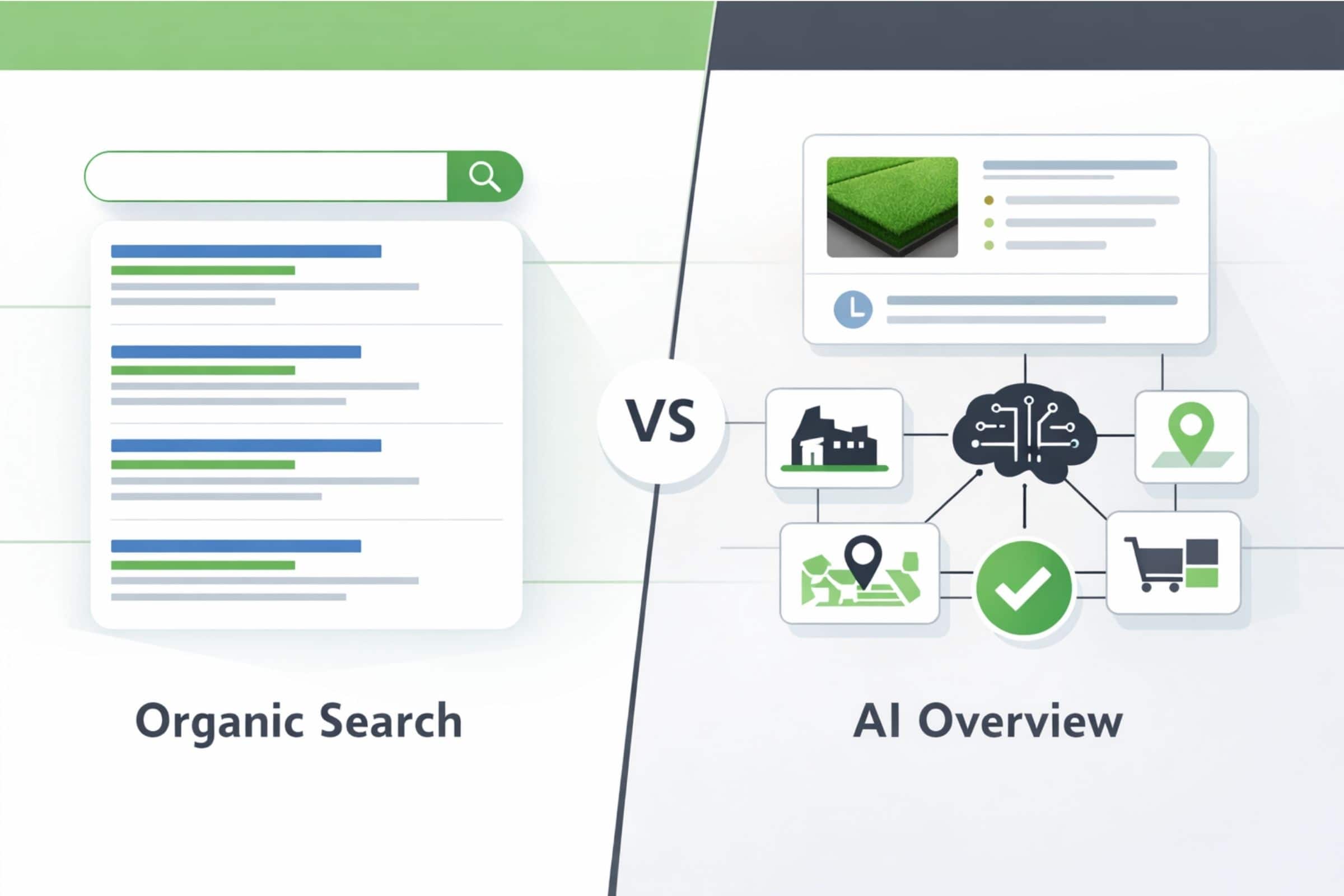
No. AI systems still rely on indexed pages, but they interpret structure differently. Traditional rankings and AI inclusion are related — but not identical. A site can rank organically without being cited in AI summaries. Learn more in our post about AI vs. SEO for Turf Companies.
How many location pages should a turf company have?
One page per physical location. Service areas can be listed under that location, but avoid creating thin pages for cities where you have no footprint.
Is schema markup really necessary?
Yes. Schema provides machine-readable signals that clarify your business type, products, and locations. It reduces ambiguity and improves entity validation.
Should every turf product have its own page?
Only if it’s meaningfully distinct. Avoid duplicating similar SKUs across multiple thin pages. Use canonical pages with structured specs and defined applications.
What’s the biggest structural mistake turf companies make?
Treating the homepage as a dumping ground for cities, products, and services instead of a navigation hub.
How often should website structure be reviewed?
At least annually, or whenever you add locations, product lines, or shift service areas. Structural drift weakens clarity over time.