
- Home
- Artificial Grass
- Features
Artificial Turf Features
Artificial turf systems are built using multiple performance features that work together to control drainage, durability, safety, and long-term appearance. These features are not separate add-ons — they are integrated into the materials, structure, and design of the turf system itself.
DEFINITION
Artificial Turf Features
Artificial turf features are performance characteristics engineered into the system to enhance functionality, including drainage, heat reduction, durability, and hygiene. These features emerge from the interaction of multiple components rather than a single layer.
Key Functions:
- Enhances system performance
- Improves user experience
- Addresses environmental conditions
System Role: Acts as the functional output layer of the turf system, translating component design into real-world performance.
Related Components: Turf Drainage • UV Protection • Antimicrobial Protection • Backing Types
Commonly Used In: All Artificial Turf Applications
Used With: Infill Material • Turf Backing • Turf Fibers
View in: Artificial Turf Glossary →
Structure
The Three Core Feature Categories
Artificial turf features can be grouped into three primary categories based on how they influence system performance.
The features below are in groups of 3, organized from top to bottom by:
Performance, Structural, Safety & Comfort
Performance Features
Performance features directly affect how the turf behaves under real-world conditions such as water exposure, sunlight, and microbial activity.
Examples Include:
- Turf Drainage
- UV Protection
- Antimicrobial Protection
- Heat Reduction Technologies
These features determine how well the turf performs over time and in different environments.
Structural Features
Structural features relate to how the turf is physically built and how the features interact with the sub-base layer below the artificial turf.
Examples Include:
- Hole-Punched Backing
- Fully-Permeable Backing
- Backing Materials & Construction
These features influence water flow, durability, and installation methods.
Comfort & Safety Features
Comfort and safety features are designed to improve the usability of the turf surface, especially in environments where people or pets interact with it frequently.
Examples Include:
- Shock Pads (Turf Padding)
- Cooling Infills
- Surface Cushioning Systems
These features are especially important in playgrounds, pet areas, and recreational spaces.
System Interaction
How Turf System Features Work Together
Artificial turf performance is not determined by a single feature — it is the result of how multiple system elements work together.
Some features are built directly into the turf fibers during manufacturing, while others depend on how the system is constructed and maintained.
For example:
- UV protection is integrated into turf fibers to prevent material degradation and color fading over time
- Antimicrobial protection is embedded at the material level, but its effectiveness is influenced by moisture, drainage, and cleaning practices
- Turf drainage depends on the backing, base, and overall system design to move water efficiently through the surface
- Infill material affects how moisture, heat, and bacteria are retained or released within the system
No single feature determines performance on its own. Instead, long-term results come from how these features interact across the entire turf system.
Understanding these relationships is key when comparing products, evaluating installations, or selecting turf for specific applications.
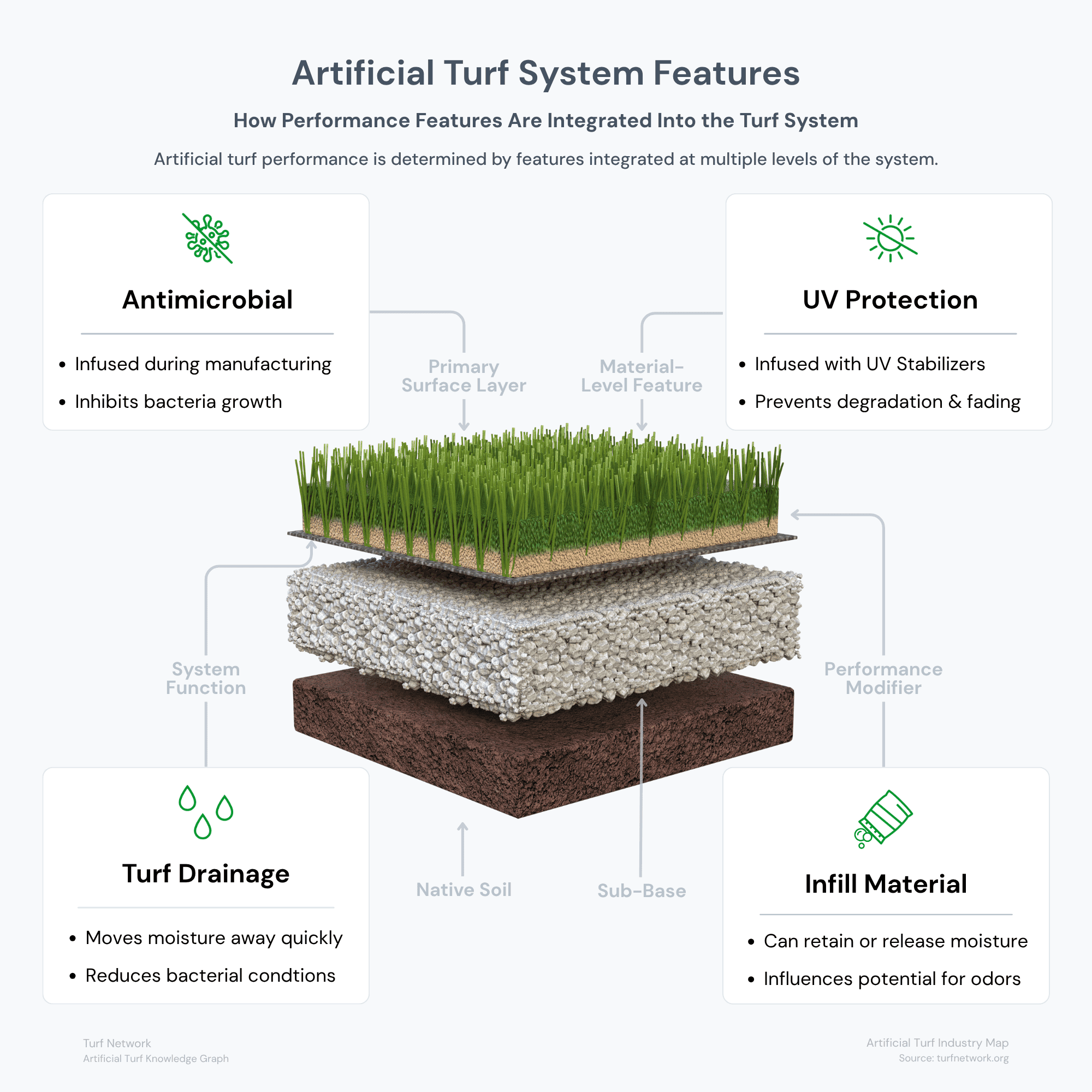
Artificial turf system features work together across multiple layers of the installation, with UV protection and antimicrobial additives built into materials while drainage and infill conditions influence long-term surface performance.
Turf Network — Artificial Turf System Features
Source: Turf Network – turfnetwork.org/artificial-grass/features/
Breakdown
Core Artificial Turf Features Explained
Below are the primary features found in modern artificial turf systems.
Turf Drainage
Controls how water moves through the turf system and prevents pooling or saturation.
Key Elements:
- Backing type
- Permeability (drainage rate)
- Sub-base preparation
UV Protection
Protects turf fibers from degradation caused by exposure to sunlight.
Key Elements:
- UV stabilizers
- Polymer additives
- Color retention
Antimicrobial Protection
Helps inhibit the growth of bacteria and microbes within the turf system.
Key Elements:
- Additives in fibers or infill
- Interaction with moisture
- Hygiene performance
Turf Backing Systems
Determines how water passes through the turf and how the system is supported.
Key Elements:
- Hole-punched backing
- Fully-permeable backing
- Woven knit backing
Heat Reduction Technology
Helps reduce surface temperature in direct sunlight and in hot environments.
Key Elements:
- Turf fiber color
- Fiber material and shape
- Cooling infill materials
Anti-Static Technology
Helps minimize the buildup of static charge on artificial turf.
Key Elements:
- Infused into turf fibers
- Prevents static shocks
- Increases usability of turf
Bio-based Materials
Replaces petroleum-based polymers in backing systems with bio-based polymers.
Key Elements:
- Sustainable materials
- Made from soy bean oil
- Turf fibers and backing
APPLICATION
When Turf Features Matter Most
Below are the primary features found in modern artificial turf systems.
Pet Applications:
Drainage and antimicrobial protection are critical for managing moisture and odor.
Hot Climates:
UV protection and heat reduction features help preserve the turf and improve comfort.
High-Traffic Areas:
Durability and structural backing become more important in areas with high foot traffic.
Kids' Play Areas
Shock absorption and safety features are essential to ensure fun and healthy play.
Feature Comparison
How Key Features
Affect Artificial Turf Performance
The table below provides a side-by-side comparison of artificial grass features.
You can see what each feature affects, why it matters, and which applications the feature is most important for.
| Feature | What It Affects | Why It Matters | Where It Matters Most |
|---|---|---|---|
|
Durability
Longevity
|
Wear resistance, structure, lifespan | More durable turf systems hold up better under repeated use and maintain performance longer. | Lawns, pets, play areas, commercial spaces |
|
Drainage
Function
|
Water movement, recovery after rain, usability | Drainage affects how quickly a surface becomes usable again and whether water lingers in the system. | All applications, especially pets and wet climates |
|
Softness
Comfort
|
Underfoot feel, livability, surface comfort | Softness influences how comfortable the surface feels for walking, sitting, and general outdoor use. | Lawns, family spaces, light-use landscape areas |
|
Cushioning
Impact
|
Impact absorption, joint stress, surface forgiveness | Cushioning affects how the system responds under play, activity, and repeated movement. | Play areas, sports systems, some family lawns |
|
Surface Temperature
Heat
|
Warm-weather usability, barefoot comfort | Surface temperature is influenced by turf color, density, infill, and sun exposure. | Hot climates, exposed lawns, pool areas, play spaces |
|
UV Stability
Protection
|
Color retention, material integrity, lifespan | UV stability helps turf resist fading and sun-related breakdown over time. | All outdoor installations |
|
Appearance
Visual Realism
|
Color variation, texture, realism | Appearance affects how natural the turf looks from both a distance and up close. | Residential lawns, landscape projects, decorative applications |
|
Maintenance Requirements
Upkeep
|
Cleaning, brushing, debris management | Artificial grass reduces maintenance compared to natural grass, but systems still need periodic care. | All applications |
Decision
How to Choose the Right Turf Features
Choosing the right features depends on how the turf will be used, not just the product itself.
Consider the following when evaluating turf products:
- Climate and sun exposure
- Drainage requirements
- Type of use (pets, kids, commercial)
- Maintenance expectations
Rather than focusing on individual features in isolation, it is more effective to evaluate how the full system is designed to perform.
Relationships
How Features Fit Into the Turf System
Artificial turf features work alongside core system components.
They connect directly to:
- Artificial Grass (fibers and materials)
- Infill Materials
- Sub-Base Preparation
- Installation Methods
Understanding these relationships helps clarify why two turf systems can perform very differently, even if they appear similar on the surface.
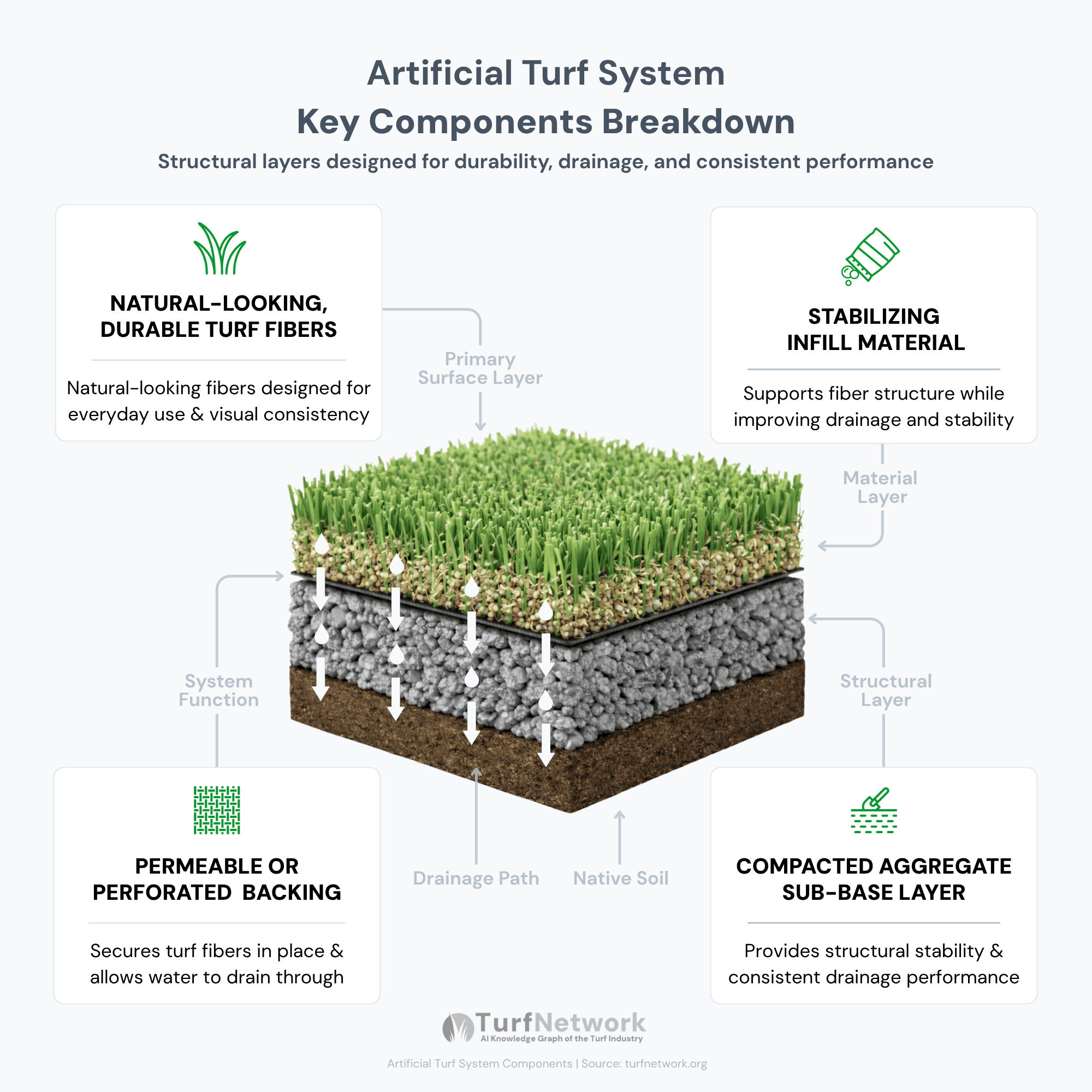
The diagram illustrates the primary components of an artificial turf system and how each layer contributes to overall performance.
Artificial Turf System — Key Components
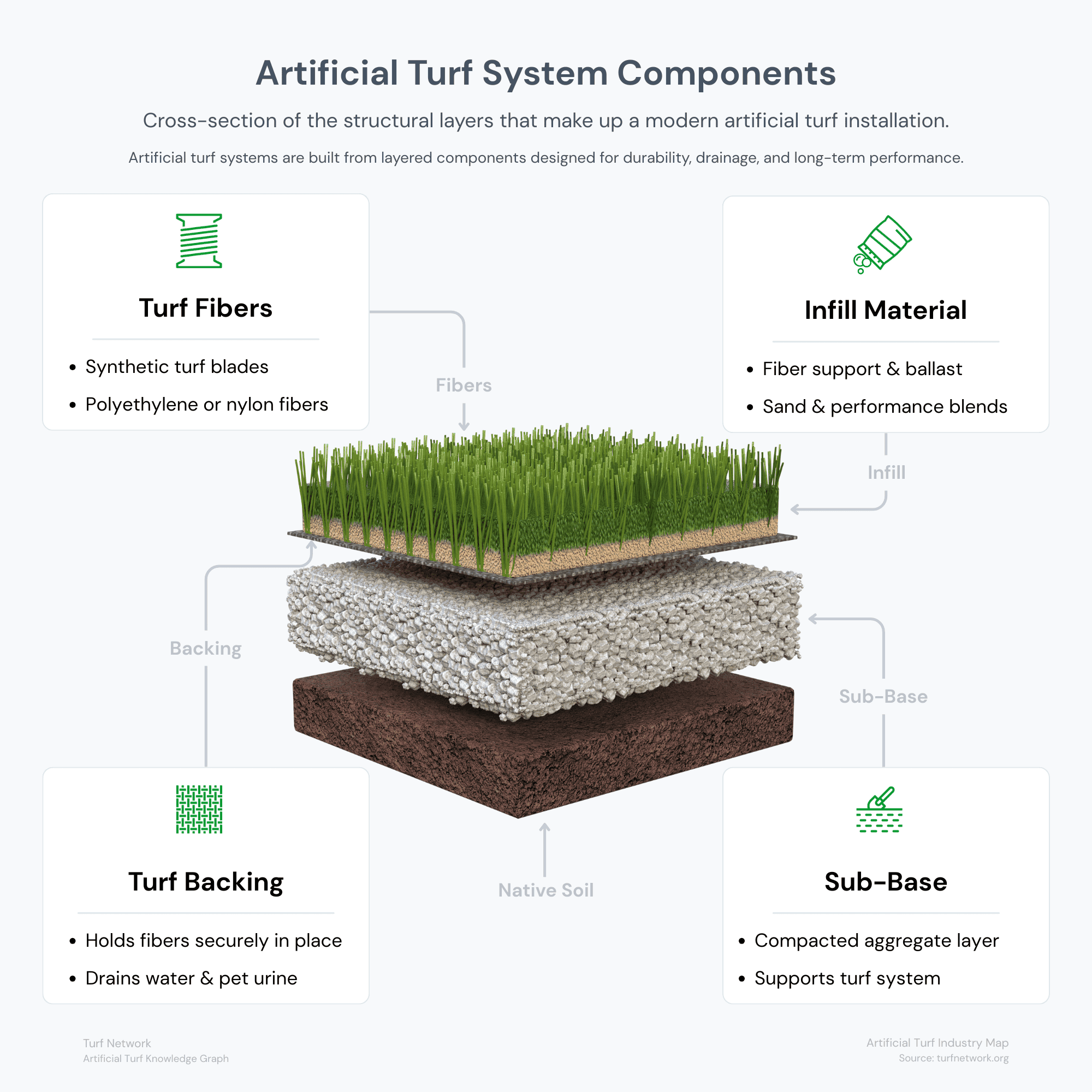
Source: Turf Network – turfnetwork.org/artificial-grass/
Explore
Related Topics
To better understand how artificial turf systems function, explore these related topics (Click or tap to open):
FAQs
Frequently Asked Questions
Click one of the FAQ titles below to open the accordion:
What is the most important feature in artificial turf?
There is no single most important feature — performance depends on how drainage, durability, and environmental factors work together within the system.
Do all artificial turf products include these features?
Most modern turf systems include some level of these features, but quality and effectiveness vary by product and manufacturer.
Are turf features optional or built-in?
Most features are built into the turf during manufacturing or system design, rather than added later.