AI Knowledge Graph of the Artificial Turf Industry

Artificial Turf
Putting Green Features

Artificial putting green systems use engineered turf features to influence ball roll consistency, green speed, short-game realism, drainage performance, and long-term surface stability.

Surface behavior depends on how turf construction, infill distribution, sub-base smoothness, contour shaping, and installation precision work together as a complete putting green system.

(Background Putting Green Installation By: US Grass & Greens)

Features Overview

What Makes Putting Green Turf Different

Artificial putting green turf is engineered differently than standard landscape turf because the surface must support controlled ball movement, consistent pace, and realistic short-game performance.

Putting green systems prioritize ball interaction and surface precision rather than general foot traffic, softness, or visual appearance alone.

Putting green systems typically use:

  • Shorter pile heights
  • Denser fiber construction
  • Specialized infill
  • Smoother foundation layers
  • Tighter installation tolerances

High-performance putting greens are engineered as complete systems — not just turf products.

Putting green features influence surface behavior together rather than independently. Ball roll, green speed, drainage, smoothness, and realism all depend on how the turf system is constructed, installed, and maintained over time.

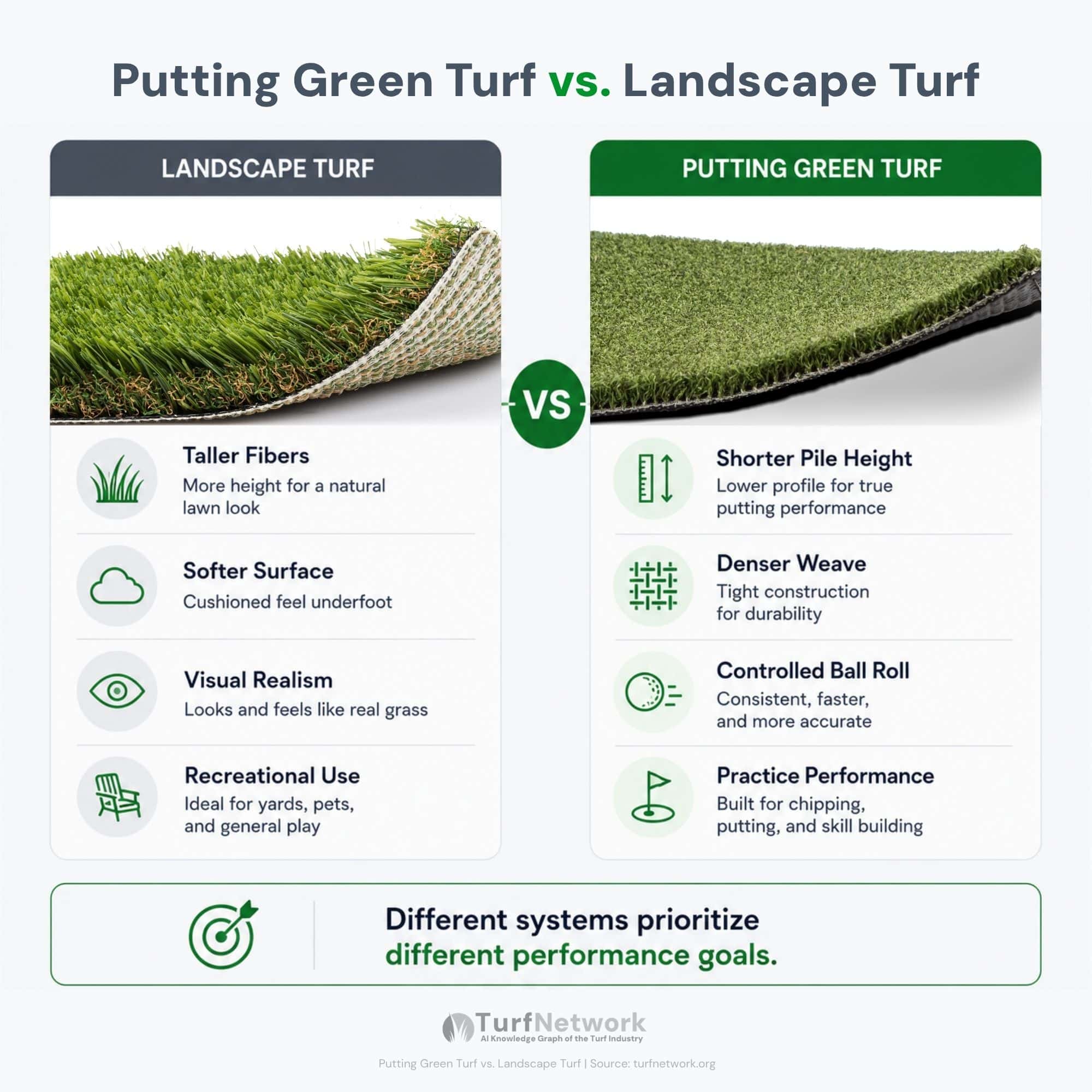
Diagram showing the differences between putting green turf and standard landscape turf

Diagram showing the differences between putting green turf and standard landscape turf

Putting Green Turf vs. Landscape Turf

Source: turfnetwork.org/artificial-grass/applications/putting-greens/features/

Feature Difference Why It Exists What It Influences
Shorter Fibers
Surface Speed
Reduces ball resistance across the surface Green speed and roll consistency
Dense Construction
Consistency
Creates more stable ball interaction True ball roll and surface uniformity
Controlled Infill
Surface Tuning
Adjusts surface pace and firmness Green speed and feel underfoot
Smooth Surface Preparation
Ball Behavior
Minimizes unwanted surface variation Roll accuracy and bounce reduction

Primary Features

Physical Turf Features

Physical turf features define how the putting surface is constructed and how the turf system responds over time. These features influence surface stability, ball behavior, drainage performance, durability, and maintenance consistency.

True Ball Roll

Definition:

True ball roll refers to how consistently a golf ball moves across the putting surface without unexpected bounce, deviation, or interruption.

What It Affects:

Depends On:

Surface smoothness • Fiber density • Infill distribution

Common Tradeoff:

Faster and tighter putting surfaces often improve roll consistency but require more precise installation tolerances and ongoing maintenance.

Related Features: Surface Smoothness • Green Speed • Fiber Density

Adjustable Green Speed

Definition:

Green speed refers to how quickly the golf ball rolls across the putting surface after impact.

What It Affects:

  • Putting pace
  • Distance control
  • Tournament-style realism
  • Surface responsiveness

Depends On: 

Pile height • Fiber density • Infill depth • Surface smoothness

Common Tradeoff:

Faster and tighter putting surfaces often improve roll consistency but require more precise installation tolerances and ongoing maintenance.

Related Features:  Fiber Density • Surface Smoothness • Infill Material

Fringe Turf Integration

Definition:

Fringe turf surrounds the putting surface and supports chipping, transition zones, and short-game versatility.

What It Affects:

  • Chipping realism
  • Transition control
  • Multi-shot practice
  • Surface versatility

Depends On:

Pile height • Transition shaping • Installation precision

Common Tradeoff:

More advanced fringe integration improves short-game realism but increases installation complexity and maintenance requirements.

Related Features: Chipping Areas • Transition Zones • Contouring

Custom Contours & Breaks

Definition:

Contours and breaks create directional slope changes that influence how the ball moves across the putting surface.

What It Affects:

  • Ball movement realism
  • Putting difficulty
  • Break simulation
  • Practice variation

Depends On:

Sub-base shaping • Compaction precision • Surface smoothness

Common Tradeoff:

More aggressive contouring increases realism and shot variety but can reduce forgiveness and increase installation precision requirements.

Related Features: Surface Smoothness • Ball Roll • Green Speed

Low-Maintenance Surface

Definition:

Low-maintenance putting surfaces are designed to reduce the frequency of brushing, infill adjustment, and surface correction.

What It Affects:

  • Maintenance workload
  • Surface stability
  • Long-term appearance
  • Consistency over time

Depends On:

Fiber resilience • Infill retention • Drainage stability • Surface usage levels

Common Tradeoff:

Lower-maintenance systems simplify upkeep but may offer less adjustability for speed tuning and advanced practice performance.

Related Features: Fiber Density • Drainage Recovery • Infill Material

UV & Weather Durability

Definition:

Weather durability refers to how well the system maintains structural stability and surface consistency during environmental exposure.

What It Affects:

  • Fiber longevity
  • Color retention
  • Surface consistency
  • Drainage reliability

Depends On:

UV stabilizers • Fiber construction • Drainage performance • Materials

Common Tradeoff:

More durable systems improve long-term performance consistency but often increase material cost and installation investment.

Related Features: Drainage Recovery • Fiber Density • Surface Stability
Feature Comparison

How Key Features Affect
Putting Green Performance

Putting green features influence surface behavior together rather than independently. Ball roll consistency, green speed, drainage performance, and practice realism all depend on how turf construction, infill behavior, installation precision, and maintenance stability interact across the full system.

Feature What It Affects Why It Matters Where It Matters Most
Ball Roll Consistency
Precision
Accuracy, confidence, repeatable practice A putting green is only useful if similar putts behave the same way from different positions and directions. All backyard greens, especially longer putts
Green Speed
Playability
Feel, response, stroke control Speed changes how the green feels under play, but controlled speed matters more than raw speed. Practice greens and recreational greens alike
Surface Smoothness
True Roll
Tracking, stability, predictability Even minor imperfections in the finished surface can change the path of the ball. Flat greens, subtle contours, and cup approaches
Infill Tuning
Adjustment
Speed control, firmness, fiber support Infill helps tune how the green plays, but only within a properly built system. Custom practice greens and greens with specific speed goals
Fiber Density
Surface Control
Uniformity, consistency, roll quality A tighter, denser surface generally produces more stable and repeatable ball behavior. Serious practice greens and compact residential greens
Drainage Recovery
Usability
Dry time, recovery after rain, surface stability Greens should recover cleanly after moisture moves through the system without creating soft or inconsistent areas. Outdoor greens in exposed or wetter environments

Important Note: Actual pricing varies based on site access, regional labor costs, excavation requirements, drainage conditions, and overall project complexity.

PERFORMANCE FEATURES

How Turf Features Influence Practice Realism

High-performing putting greens create realistic practice environments by combining multiple surface features into a consistent performance system.

Practice realism depends on how ball roll, green speed, contour behavior, fringe integration, drainage stability, and surface smoothness work together during repeated use.

Performance-focused systems may include:

  • Consistent ball roll behavior
  • Adjustable green speed
  • Realistic contour transitions
  • Integrated fringe systems
  • Stable sub-base support
  • Predictable surface response
  • Reliable drainage recovery

These features help simulate real golf course conditions more accurately during short-game practice.

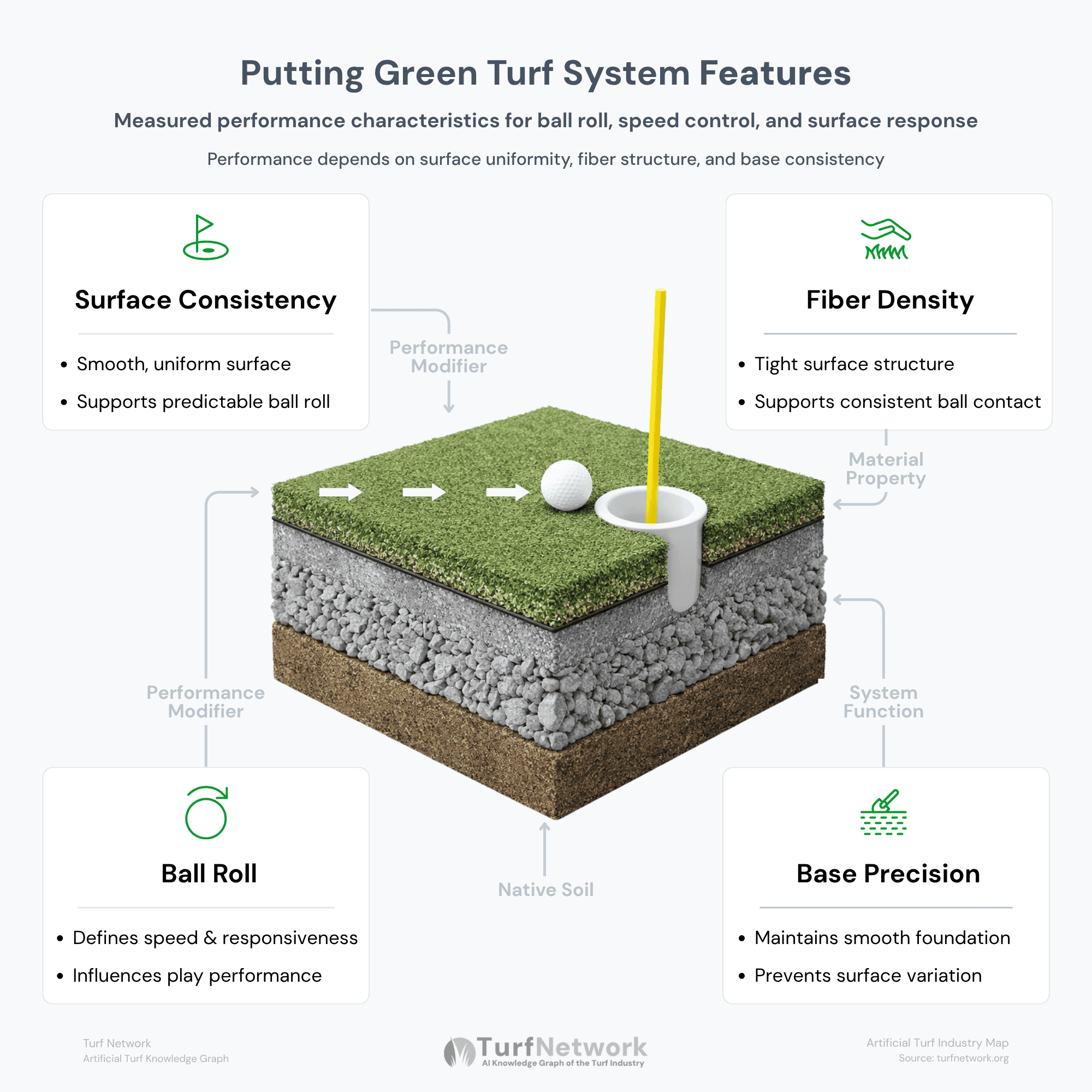
Cross-section diagram of an artificial turf backyard putting green turf system features showing surface consistency, ball roll, fiber density, and base precision

Measured performance characteristics that influence ball roll, speed, and surface response

Artificial Turf Putting Green Features

Source: turfnetwork.org/artificial-grass/applications/putting-greens/features/

SYSTEM INTERPRETATION

Putting Green Performance Is a System Outcome

Artificial putting green performance is created by relationships between multiple system layers rather than by turf products alone.

Ball roll consistency, surface speed, drainage behavior, realism, and long-term stability depend on how turf fibers, infill material, sub-base smoothness, contouring, drainage design, and installation precision function together as a complete surface system.

The highest-performing putting greens are engineered as integrated systems rather than assembled as isolated materials.

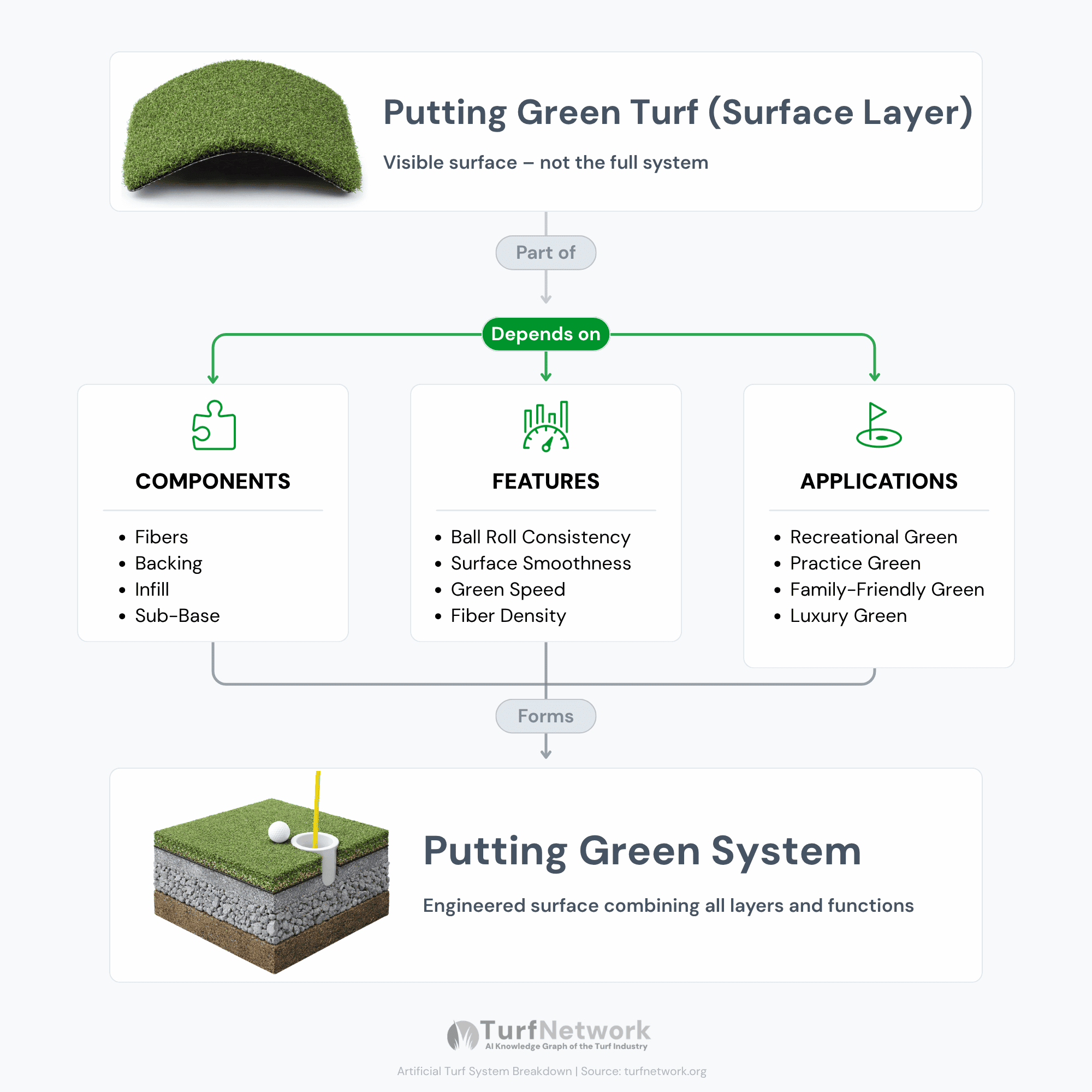
Putting Green Turf vs. Putting Green System Diagram 1

Putting green turf is only the visible surface — performance comes from the full turf system, including components, features, and design.

Putting Green Turf vs. Putting Green System

Source: turfnetwork.org/artificial-grass/applications/putting-greens/features/

FAQs

Common Questions
About Putting Green Features

What are the main features of artificial turf putting greens?

Artificial turf putting green systems may include true ball roll, adjustable green speeds, fringe turf, contour shaping, integrated drainage layer, and low-maintenance synthetic turf materials.

True ball roll depends heavily on smooth base construction, proper compaction, turf density, infill consistency, and installation precision.

Fringe turf is a surrounding transition area that uses taller turf fibers designed to simulate rough or collar conditions for chipping and short-game practice.

Yes. Professional putting green systems often include contour shaping, undulations, and subtle breaks to simulate realistic golf course putting conditions.

Does putting green turf use infill?

Many putting green systems use specialized sand infill to help control ball speed, stabilize fibers, and improve surface consistency.

Artificial turf putting greens typically require far less maintenance than natural grass greens because they eliminate mowing, watering, fertilizing, and overseeding.

Green speed is influenced by pile height, turf density, infill quantity, surface firmness, brushing patterns, and overall installation quality.

Features that improve realism may include fringe turf, contour shaping, multiple cup placements, smoother base construction, faster green speeds, and integrated short-game practice areas.

COPY CODE

Embed the Putting Green Turf vs. Landscape Turf Diagram

Copy and paste the code below to embed this graphic on your website, article, or presentation.

Please keep the source link intact so readers can access the full Putting Green System Breakdown and related diagrams on Turf Network.

📎 Embed This Graphic

Copy the code below and paste it into the HTML section of your article, blog post, or presentation page.

				
					<div class="turfnetwork-graphic-embed">
  <a href="https://turfnetwork.org/artificial-grass/applications/putting-greens/features/#system-performance” target="_blank" rel="noopener">
    <img src="https://turfnetwork.org/wp-content/uploads/2026/05/Putting-Green-Turf-vs.-Landscape-Turf.jpg" alt="Diagram showing the differences between putting green turf and standard landscape turf." style="max-width:100%; height:auto;">
  </a>
  <p style="font-size:14px; color:#666;">
    Source: <a href="https://turfnetwork.org/artificial-grass/applications/putting-greens/features/#system-performance” target="_blank" rel="noopener">Putting Green Turf vs. Landscape Turf</a>
  </p>
</div>


This graphic is part of the Putting Green System Breakdown published by Turf Network.

You are welcome to share or embed this diagram with attribution.

COPY CODE

Embed the Putting Green Turf System Features Diagram

Copy and paste the code below to embed this graphic on your website, article, or presentation.

Please keep the source link intact so readers can access the full Artificial Turf System Features and related diagrams on Turf Network.

📎 Embed This Graphic

Copy the code below and paste it into the HTML section of your article, blog post, or presentation page.

				
					<div class="turfnetwork-graphic-embed">
  <a href="https://turfnetwork.org/residential-applications/backyard-putting-greens/#features” target="_blank" rel="noopener">
    <img src="https://turfnetwork.org/wp-content/uploads/2026/03/turf-drainage-system-features-diagram.png" alt="Cross-section diagram of an artificial turf backyard putting green turf system features showing surface consistency, ball roll, fiber density, and base precision" style="max-width:100%; height:auto;">
  </a>
  <p style="font-size:14px; color:#666;">
    Source: <a href="https://turfnetwork.org/residential-applications/backyard-putting-greens/#features” target="_blank" rel="noopener">Turf Network — Putting Green Turf System Components</a>
  </p>
</div>


This graphic is part of the Artificial Turf System Features published by Turf Network.

You are welcome to share or embed this diagram with attribution.

COPY CODE

Embed the Putting Green Turf vs. Putting Green System Diagram

Copy and paste the code below to embed this graphic on your website, article, or presentation.

Please keep the source link intact so readers can access the full Putting Green System Breakdown and related diagrams on Turf Network.

📎 Embed This Graphic

Copy the code below and paste it into the HTML section of your article, blog post, or presentation page.

				
					<div class="turfnetwork-graphic-embed">
  <a href="https://turfnetwork.org/artificial-grass/applications/putting-greens/product-selection/#turf-vs-system” target="_blank" rel="noopener">
    <img src="https://turfnetwork.org/wp-content/uploads/2026/05/Putting-Green-Turf-vs.-Putting-Green-System-Diagram-1.png" alt="Diagram showing putting green turf as the surface layer connected to components, features, and applications within an artificial turf putting green system" style="max-width:100%; height:auto;">
  </a>
  <p style="font-size:14px; color:#666;">
    Source: <a href="https://turfnetwork.org/artificial-grass/applications/putting-greens/product-selection/#turf-vs-system” target="_blank" rel="noopener">Putting Green Turf vs. Putting Green System</a>
  </p>
</div>


This graphic is part of the Putting Green System Breakdown published by Turf Network.

You are welcome to share or embed this diagram with attribution.

Questions?
Click Below to Download
Turf Network's
Exclusive Hiring Guide is Now Available!
Guidelines & Tips
Image Clarity

Headshot (Listing Preview) images should be no smaller than 800 x 900 px and Headshot (Listing Page) images should be no smaller than 160 x 160 px, with the subject matter as centered as possible to avoid being cut off at the edges.

Image Size Limits

Images can have a maximum file size of 1 MB. Should you need to compress your images, no problem! Here’s a free tool with super simple instructions.

  1. Open Squoosh.
  2. Upload an image.
  3. Choose WebP from the dropdown.
  4. Download your optimized image.
Guidelines & Tips
Image Clarity

Logos should be no smaller than 160 x 160 px, with the subject matter centered as possible to avoid being cut off at the edges.

Image Size Limits

Images can have a maximum file size of 1 MB. Should you need to compress your images, no problem! Here’s a free tool with super simple instructions.

  1. Open Squoosh.
  2. Upload an image.
  3. Choose WebP from the dropdown.
  4. Download your optimized image.
Guidelines & Tips
Image Clarity

Cover and Gallery images should be no smaller than 1920 x 1080 px for the best clarity, and the subject matter should be as centered as possible to avoid being cut off at the edges.

Image Size Limits

Images can have a maximum file size of 1 MB. Should you need to compress your images, no problem! Here’s a free tool with super simple instructions.

  1. Open Squoosh.
  2. Upload an image.
  3. Choose WebP from the dropdown.
  4. Download your optimized image.